EN
EN

The Move from Traditional Screen Printing to Digital Direct to Fabric Printing
For years, textile decorators and garment manufacturers had two main production routes: screen printing for high-volume orders or heat transfer for small batches. Screen printing demands frame preparation, emulsion coating, exposure, and washout before a single shirt can be printed. Minimum order quantities of 50 to 100 units are common just to recover setup costs. For the growing demand in custom apparel, on-demand merchandise, and limited-run fashion collections, this workflow creates a serious bottleneck. A direct to fabric printer changes the equation by printing digital images straight onto textile material without screens, plates, or transfer film. The technology uses specialized water-based pigment or reactive dye inks that bond with fabric fibers, producing prints that stand up to repeated washing and stretching. This shift from analog to digital printing is not only about speed; it enables production models that were not practical before, such as single-piece orders and same-day fulfillment for e-commerce sellers running print-on-demand storefronts.
What Makes Direct to Fabric Technology Different from Heat Transfer
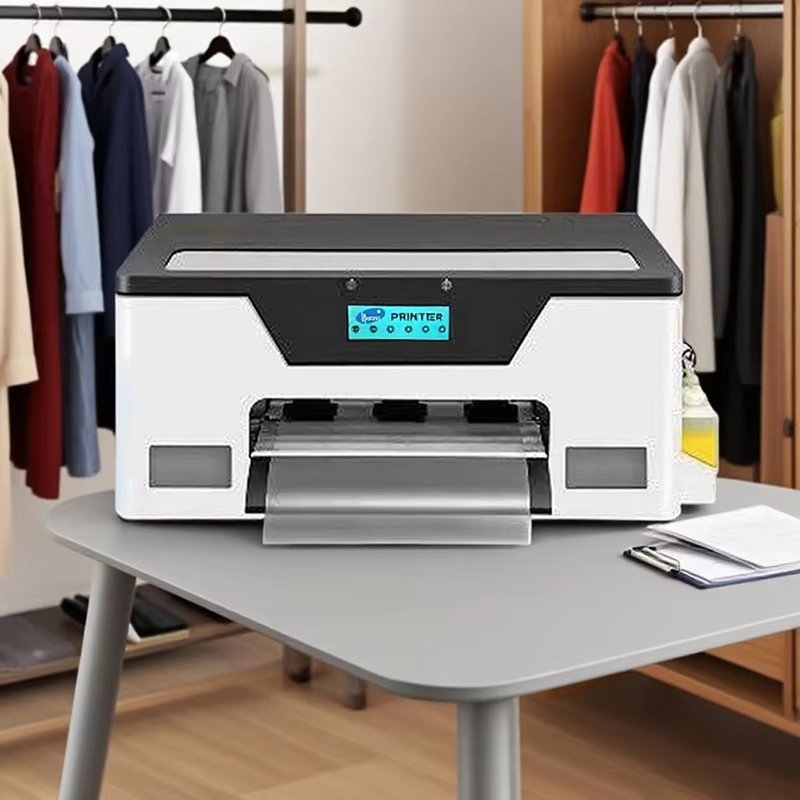
Many newcomers confuse direct to fabric printing with the heat transfer process used by Direct to Film or DTF printers. While both are digital printing methods, the workflow is fundamentally different. A DTF printer prints a design onto a PET film, applies hot-melt adhesive powder, and then uses a heat press to transfer the image from the film onto the garment. This indirect method works on many fabric types and colors, including dark garments, which is a key advantage. In contrast, a direct to fabric printer applies ink straight onto the textile substrate, similar to how a desktop inkjet prints on paper but with fabric-specific inks and a platen designed to hold textile material flat. The direct method eliminates film, powder, and the transfer step, reducing material consumption and process complexity. For businesses that print primarily on cotton, linen, or cotton-blend fabrics in light colors, a direct to fabric printer provides a simpler, leaner workflow with fewer consumables to stock and track.
Reducing Setup Time and Waste with a Direct to Fabric Printer
One of the most practical benefits of switching to a direct to fabric printer is the dramatic reduction in preparation time. A screen printing job can take over an hour just for screen preparation before production begins. A digital direct to fabric printer requires only file preparation in RIP software such as Photo Print Maintop, which usually takes minutes for a typical design file. The printer uses a micro-piezo printhead, such as the Epson XP600 operating at 1440 dpi resolution, to jet pigment or reactive ink directly onto fabric. There is no screen to reclaim, no emulsion to dispose of, and no excess ink mixed for a job that may not repeat. This reduction in material waste and labor makes the technology appealing for print shops aiming to lower their environmental footprint while improving margin on short-run work. Furthermore, the ability to switch between designs instantly allows operators to queue multiple different orders in a single production session, something screen printing cannot achieve without dedicated screens for each color in every design.
Application Flexibility from Soft Cotton to Performance Fabrics
A direct to fabric printer is not limited to cotton T-shirts. Depending on the ink system, it can handle cotton, linen, viscose, silk, and certain poly-blend textiles. Reactive dye inks bond chemically with natural fibers, producing vivid, wash-fast colors with a soft hand feel that plastisol-based screen printing cannot match. Pigment inks offer broader fabric compatibility, including some synthetic blends, with the trade-off of a slightly heavier hand feel on the printed area. For sportswear and performance fabrics that need to retain stretch and moisture-wicking properties, selecting the correct pretreatment chemistry and ink formulation is critical to maintaining fabric performance after decoration. Buyers evaluating a direct to fabric printer should confirm with the supplier which ink types are validated for their target fabric range, as not all printers support both reactive and pigment workflows without hardware modification.
How a Small Apparel Studio Scaled with Digital Fabric Printing
A small apparel studio in Southeast Asia previously relied on a local screen printer for custom T-shirt orders. Minimum order quantities meant the studio could not accept clients who wanted 10 or 20 shirts for corporate events or influencer merchandise drops. After investing in a desktop direct to fabric printer with an A3 print area, the studio began printing on demand from their own facility. Within six months, average order turnaround dropped from seven days to two, and the minimum order requirement was eliminated entirely. The studio now produces single-piece samples for brand pitches, limited-edition releases for social media campaigns, and personalized corporate gifts that were not viable under the outsourced screen printing model. Bringing production in-house not only improved unit margins but also gave the studio full creative control over print quality, color matching, and delivery timelines, which became a competitive advantage when bidding for short-notice client projects.
Supplier Evaluation Checklist for a Direct to Fabric Printer
When sourcing a direct to fabric printer, industrial buyers should evaluate suppliers against a practical checklist rather than marketing claims. First, request the product specification sheet and verify supported ink types, printable fabric range, and maximum print resolution. Printers using micro-piezo printheads at 1440 dpi or higher deliver acceptable quality for most apparel decoration applications. Second, ask about after-sales technical support availability, particularly for RIP software configuration and color profiling, which are essential for maintaining production consistency. Third, confirm whether the supplier holds relevant quality management certifications such as ISO 9001 and whether the printer carries product safety certifications like CE under standards including EN IEC 62368-1. A supplier with an in-house R and D team and a track record of shipping equipment to customers across multiple countries is better positioned to support long-term machine use. Finally, request a physical print sample on your actual target fabric before committing to any purchase, as paper specification sheets do not always reflect real-world print results on different textile substrates.
Questions and Answers
What is the difference between a direct to fabric printer and a DTF printer?
A direct to fabric printer applies ink directly onto textile material without any intermediate film or transfer process. A DTF or Direct to Film printer first prints the design onto a PET film, applies adhesive powder, and then heat-presses the image onto the garment. DTF works on a broader range of fabric types and colors, including dark garments, while direct to fabric reduces material usage and process steps for shops focused on light-colored natural fiber printing.
Can a direct to fabric printer handle dark-colored fabrics?
Most direct to fabric printers work best on light-colored fabrics because the ink is absorbed into the fibers rather than sitting on top with a white underbase like screen printing or DTF. Printing on dark fabrics with a direct to fabric printer typically requires a pretreatment step and a white ink channel, which adds complexity and cost. For dark garment printing at production scale, DTF or screen printing may be more practical options.
What ongoing maintenance does a direct to fabric printer need?
Routine maintenance includes daily nozzle checks, weekly printhead cleaning cycles, and periodic replacement of consumable parts such as dampers and capping stations. Ink can settle if the printer sits idle for extended periods, so consistent use or proper short-term storage procedures are important. Following the manufacturer maintenance schedule and using compatible ink formulations are the two most important factors in extending printer lifespan and maintaining consistent print quality.
Table of Contents
- The Move from Traditional Screen Printing to Digital Direct to Fabric Printing
- What Makes Direct to Fabric Technology Different from Heat Transfer
- Reducing Setup Time and Waste with a Direct to Fabric Printer
- Application Flexibility from Soft Cotton to Performance Fabrics
- How a Small Apparel Studio Scaled with Digital Fabric Printing
- Supplier Evaluation Checklist for a Direct to Fabric Printer
- Questions and Answers