 EN
EN

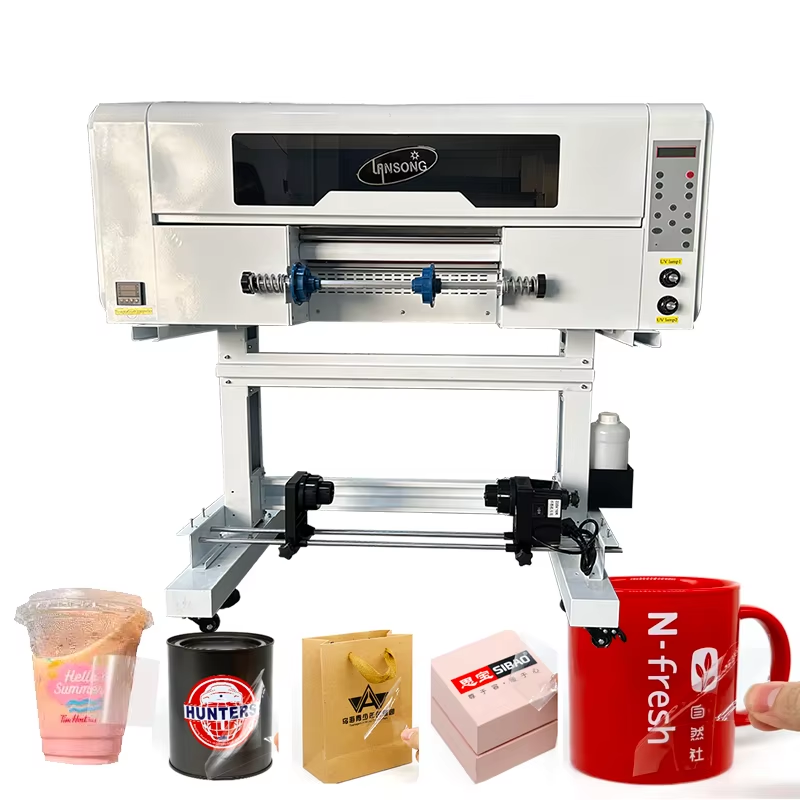
In the ever-evolving world of digital printing, the uv dtf printer has emerged as a revolutionary tool, bridging the gap between complex direct printing and simple sticker applications. As a professional at Shenzhen Shenchuangxing Technology Co., Ltd., a high-tech enterprise specializing in printer R&D and manufacturing, I've seen firsthand how this technology demystifies the process of decorating objects. We often explain to our clients that a uv dtf printer is like a highly intelligent, automated system for creating ultra-durable, ready-to-apply decals. It allows you to print vibrant, high-resolution designs onto a special film, which can then be transferred onto almost any surface—from flat metal plates to curved glass bottles—with a simple press and peel. This method bypasses the traditional limitations of printing directly onto oddly shaped or heat-sensitive items.
The Core Principle: Printing on Film First
To understand how a uv dtf printer functions, you must first grasp its core philosophy: indirect decoration. Unlike a standard UV printer that prints directly onto a product (like a pen or a phone case), the uv dtf printer prints onto a two-part film system. This system typically consists of "A film" (a PET sheet with a printed design) and "B film" (a transfer carrier with a strong adhesive). This ingenious method, which we at Shenzhen Shenchuangxing have integrated into our advanced printer solutions, mitigates the risk of damaging expensive items during printing. It also ensures that the final decal has a professional, seamless finish without a background, as only the inked area transfers onto the target object . This fundamental difference is what makes UV DTF printing so versatile and user-friendly for businesses and hobbyists alike.
Step 1: Preparing the Artwork and the "A Film"
The journey of a decal begins long before the printer starts. First, a digital design is created using software like Adobe Illustrator or specialized RIP software such as eufyMake Studio . Once the design is finalized, the physical process with the uv dtf printer begins. The operator takes the "A film," a roll of PET film that has a protective layer covering its adhesive side. This protective layer must be carefully peeled away to expose the sticky surface beneath. The exposed A-film is then loaded onto the printer's bed or feeding mechanism. At Shenzhen Shenchuangxing, we emphasize the importance of high-quality consumables; the reliability of the A-film is critical, as it's the canvas upon which your design will be built. The printer's precision handling ensures the film is perfectly positioned, ready to receive the ink without any wrinkles or misalignment.
Step 2: The Magic of UV-Curable Ink Deposition
This is where the uv dtf printer truly showcases its expertise. As the prepared A-film moves through the machine, the print heads precisely deposit layers of UV-curable ink. Unlike conventional inks that dry by evaporation, these inks are composed of liquid monomers and oligomers. The printer often lays down multiple layers: first a color layer (CMYK), then a white ink layer to make colors pop on dark or transparent surfaces, and finally a clear layer for added protection and a glossy or matte finish . This multi-layer printing is handled automatically by the machine, guided by the software's color separation. As each layer of ink is applied, it is instantly bombarded with ultraviolet light from integrated LED lamps. This light triggers a photochemical reaction, instantly turning the liquid into a solid plastic-like material. This "curing" process is immediate, so the print is dry to the touch the moment it leaves the print area.
Step 3: Laminating with "B Film" for Transfer
Once the full-color design is printed and cured onto the A-film, it moves to the lamination stage. Here, a second material, the "B film," is introduced. The B-film is a clear, highly adhesive carrier sheet. It is carefully applied on top of the printed design, typically using a cold laminator or a built-in lamination unit. This step is crucial for creating a complete "transfer sandwich." The adhesive on the B-film is stronger than the adhesive on the A-film. Therefore, when the two films are pressed together and then separated later, the cured ink and the adhesive layer from the A-film will transfer onto and stick to the B-film . The B-film effectively becomes the temporary backing for your sticker, holding the design securely until it is ready to be applied to its final surface.
Step 4: The Simple Application Process
After lamination, the completed transfer is ready for use. The application process is where the simplicity of a uv dtf printer workflow becomes most apparent for the end-user. To apply the decal, you simply peel away the original A-film. What remains on the B-film is your design, encased in durable, cured ink with a pressure-sensitive adhesive backing. You then place the B-film against the target item—be it a water bottle, a laptop, or a curved automotive part—and firmly burnish it with a squeegee or your thumb. This action activates the adhesive, bonding the design to the new surface. Finally, you carefully peel away the B-film. The design, thanks to the stronger adhesive of the B-film, is now bonded to your item, leaving a vibrant, durable decal with no background or excess material to weed away .
Why UV DTF Outperforms Traditional Methods
The expertise behind the uv dtf printer lies not just in its mechanics but in the superior results it delivers. As a manufacturer, Shenzhen Shenchuangxing has seen a surge in demand for these printers because they solve long-standing industry problems. The prints are exceptionally durable, resisting scratches, water, and UV fading for 3 to 5 years or more, making them suitable for both indoor and outdoor use . Furthermore, because the ink is cured on a flat film rather than a curved object, the risk of "head strikes"—where the printer nozzle crashes into a tall or uneven item—is completely eliminated . This not only protects your investment in the printer but also allows for consistent, high-quality output on thousands of items without constant re-calibration.
Expanding Business Horizons with a UV DTF Printer
From our experience at Shenzhen Shenchuangxing Technology Co., Ltd., providing professional printer solutions to global partners, the practical applications of a uv dtf printer are virtually limitless. Our clients use them to create stunning customizations on promotional products like golf balls and power banks, durable labels for industrial parts, and intricate decorations for handmade crafts and gifts . The ability to print multiple designs on a single sheet of film makes it incredibly efficient for batch work . Whether you are creating small-batch custom phone cases for an online store or producing hundreds of branded tumblers for a corporate event, the uv dtf printer offers a workflow that is fast, reliable, and produces consistently professional results that build trust with your customers.
Table of Contents
- The Core Principle: Printing on Film First
- Step 1: Preparing the Artwork and the "A Film"
- Step 2: The Magic of UV-Curable Ink Deposition
- Step 3: Laminating with "B Film" for Transfer
- Step 4: The Simple Application Process
- Why UV DTF Outperforms Traditional Methods
- Expanding Business Horizons with a UV DTF Printer