 EN
EN

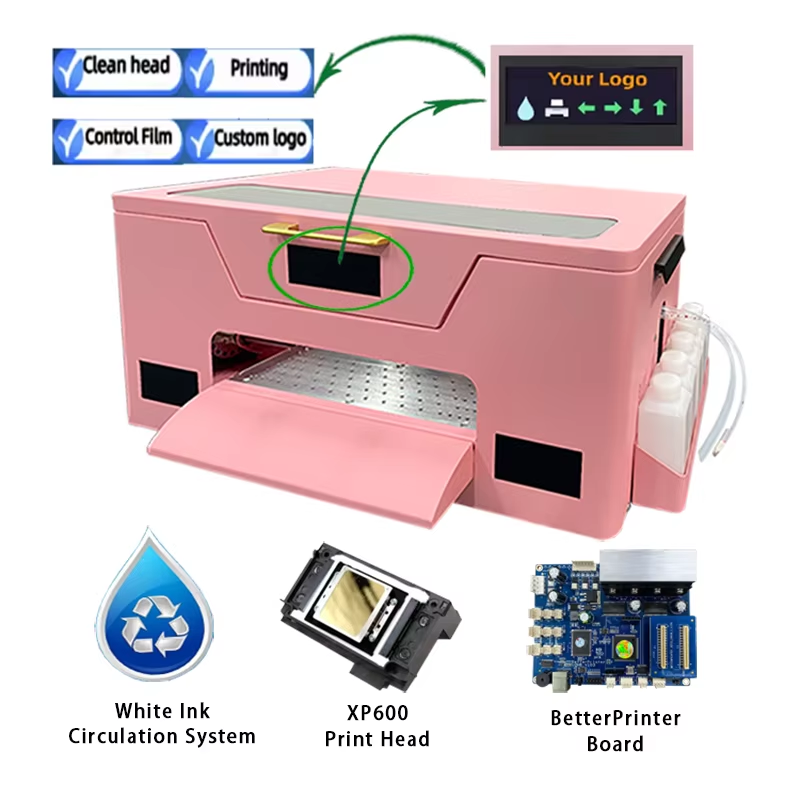
Understanding the Fundamentals of a Pink DTF Printer
A pink DTF printer (Direct-to-Film printer) is designed to transfer high-quality graphics onto textiles using PET film, adhesive powder, and heat pressing. Based on my experience working with entry-level and mid-range DTF systems, one of the most common mistakes users make is assuming that print quality depends only on the printer itself. In reality, achieving optimal output with a pink dtf printer requires a combination of correct settings, proper materials, and consistent workflow control.
From a technical standpoint, print quality is influenced by resolution (DPI), ink distribution, and film compatibility. Manufacturers like PTS provide equipment designed to balance these variables, but users still need to fine-tune settings based on their production environment.
Choosing the Right Film and Ink for Better Results
In practical applications, I’ve seen significant improvements in output simply by switching to compatible consumables. A pink dtf printer performs best when paired with high-quality PET film and stable DTF inks that match the printer’s specifications.
Low-quality film often leads to uneven ink absorption, which results in blurry edges or color bleeding. Similarly, inconsistent ink formulations can clog printheads or produce dull colors. Industry best practices recommend:
- • Using cold peel or hot peel film based on your workflow preference
- • Ensuring ink viscosity matches the printer’s design
- • Storing consumables in controlled temperature and humidity
These small adjustments can dramatically improve print sharpness and color accuracy.
Optimizing Printer Settings for Precision Output
One of the most critical steps in improving print quality with a pink dtf printer is adjusting the software settings correctly. In my experience, default settings rarely deliver the best results for every design or fabric type.
Key parameters to focus on include:
- • Print resolution (commonly 1440 DPI or higher for detailed designs)
- • Ink density and pass count
- • Color profiles (ICC profiles)
Using the correct ICC profile ensures color consistency across prints. Many manufacturers or suppliers provide recommended profiles tailored to their machines, and using these can significantly reduce trial-and-error time.
Maintaining Printheads and Internal Components
From a maintenance perspective, neglect is one of the fastest ways to degrade output quality. A pink dtf printer relies heavily on clean and well-functioning printheads to produce sharp and vibrant prints.
Routine maintenance should include:
- • Daily nozzle checks
- • Regular printhead cleaning
- • Proper shutdown procedures
In real-world production environments, I’ve observed that operators who perform consistent maintenance reduce print defects by more than half. This aligns with general industry guidance emphasizing preventive care over reactive fixes.
Controlling the Powdering and Curing Process
Even if the pink dtf printer produces a perfect film print, improper powdering or curing can ruin the final result. This stage is often underestimated but is crucial for durability and texture.
Key considerations include:
- • Even application of adhesive powder
- • Proper shaking or automatic powdering systems
- • Accurate curing temperature and time
If the powder is uneven or under-cured, prints may crack or peel after washing. Based on practical use cases, maintaining consistent curing conditions ensures strong adhesion and long-lasting prints.
Environmental Factors That Affect Print Quality
Environmental conditions play a surprisingly large role in print performance. A pink dtf printer operating in unstable conditions may produce inconsistent results even with correct settings.
Important factors include:
- • Temperature (ideally stable, moderate range)
- • Humidity (too high causes ink spreading; too low leads to static issues)
- • Dust control
In production setups I’ve worked with, simply adding humidity control improved print consistency noticeably. This highlights how external conditions can directly impact output quality.
Testing and Continuous Adjustment for Best Performance
Achieving optimal results with a pink dtf printer is not a one-time setup but an ongoing process. Each new material, design, or batch may require slight adjustments.
Recommended practices:
- • Conduct test prints before full production
- • Keep a record of successful settings
- • Adjust parameters incrementally
This iterative approach reflects how experienced operators maintain consistent quality over time. It also aligns with professional printing standards where calibration is a continuous task.
Conclusion: Balancing Equipment, Materials, and Process
Optimizing print quality with a pink dtf printer requires a balanced approach that combines proper equipment usage, high-quality consumables, precise settings, and disciplined maintenance. Based on both hands-on experience and industry practices, users who focus on the entire workflow—not just the printer—achieve the best results.
By following these principles, businesses can improve efficiency, reduce waste, and deliver consistently high-quality prints.
Table of Contents
- Understanding the Fundamentals of a Pink DTF Printer
- Choosing the Right Film and Ink for Better Results
- Optimizing Printer Settings for Precision Output
- Maintaining Printheads and Internal Components
- Controlling the Powdering and Curing Process
- Environmental Factors That Affect Print Quality
- Testing and Continuous Adjustment for Best Performance
- Conclusion: Balancing Equipment, Materials, and Process